 Calder
For sample pack makers & instrument sound designers
A finishing studio for your samples.
Organize, standardize, and verify filenames and audio specs in one workspace. Finish quickly—deliver with certainty.

Quality control for filenames and audio
The core idea
Filenames, treated as data.
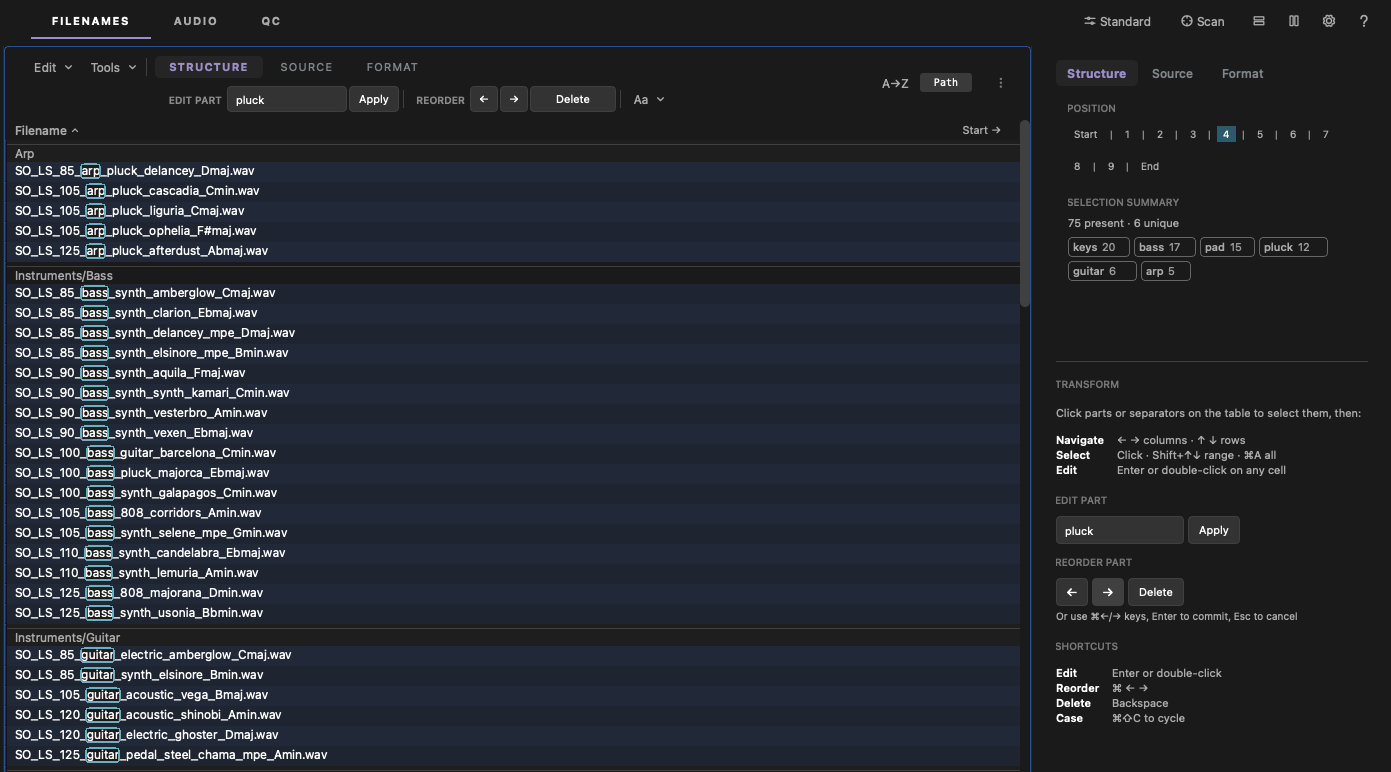
Calder parses every filename into parts—instrument, key, tempo, take—not a string of characters. Select a part across five hundred files and change it once: move it, merge it, re-case it, or swap it from generated name lists in the Pool. And when a pass needs real ears, tag files as you listen from a preset Palette—or build your own.
- Part-based selection, across any number of files
- Move, merge, insert, and re-case parts in place
- Everything undoable, everything logged—with exportable reports
Like region editing in a DAW—except the regions are words.
Everything the finish needs.
Filenames
Text Palette & Pool
Keep your working vocabulary on screen. Clipboard slots, reusable parts, and a pool of values you can apply anywhere.
Keyboard-first navigation
Folders under one hand, files under the other. Every action has a key—the mouse is optional.
Every value, by position
Land on any position in the name and see every value that lives there across the whole folder—then filter to any of them with a click or a keystroke.
Audio
Batch standards
Sample rate, bit depth, normalization, fades, silence removal—applied to a whole pack in one pass.
Tailmaker
Give truncated samples proper endings. Tails that sound natural, not chopped.
Export by transient
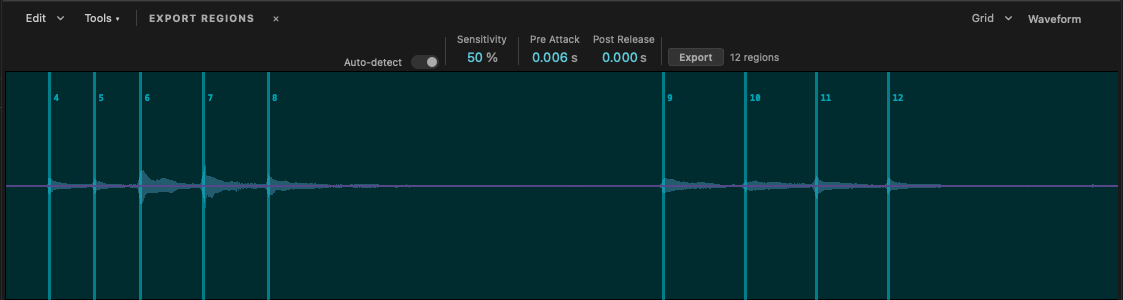
Slice a performance into regions at every hit and export each as its own file—with a structured name, not "region_01".
Quality Control
Scan everything
Validate names, audio specs, loops, and notes against your rules. See every issue. Fix them in batch. Export the report.
Preview pair check
Every preset, loop, or MIDI matched to its preview render. Missing, misnamed, or duplicated pairs—caught before you deliver.
For instrument designers
From folder to Serum 2 instrument.
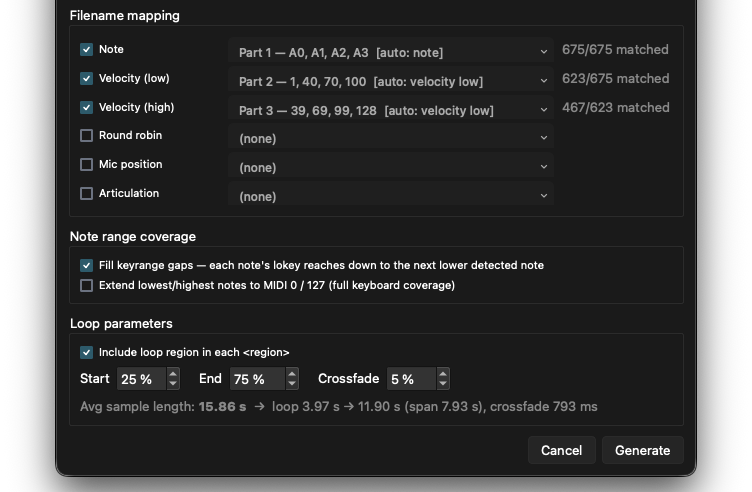
Start from a folder of multisamples—or one long field recording. Split it into regions at transients, name every slice with a semantic scheme, verify keys and loop points, then generate an SFZ that loads straight into Serum 2's multisampler—or any SFZ-compatible sampler.
Start with one recording — split it at every transient
The full toolbench.
Sample-perfect loops. Flawless filenames.
- Semantic part editing—move, merge, insert, re-case parts across any selection.
- Find & replace—with live filters and match navigation.
- Pool—generated name lists, applied per-file or per-selection.
- Palettes—preset and custom tag sets for listening passes.
- Naming rules—case, separators, key and BPM formats, saved as presets.
- Structure rail—see and edit the shape of names across a folder.
- Position summary—every value at a given position across the folder; filter by any of them in a keystroke.
- Folder generation—build folder trees from parts and tags; files file themselves.
- Conflict handling—collisions caught and resolved before anything touches disk.
- Generate—build filenames from parts, metadata, and numbering schemes.
- Batch standards—format, sample rate, bit depth, normalize, fades, silence removal—a whole pack in one pass.
- Standards presets—save your delivery specs once, apply them to any pack.
- SoXR conversion—sample-rate conversion through the SoX resampler, a reference engine for transparent SRC.
- Format conversion—save any file or selection to a new format and spec.
- Filename validation—every name checked against your rules.
- Audio validation—spec, level, clicks, zero-crossings.
- Loop QC—sample-accurate bar math; relabel BPM or trim-and-fade in one click.
- Note QC—pitch detection for one-shots; catch mislabeled keys.
- Preview pair check—match any two file types by name (presets↔previews, MIDI↔renders); catch missing, misnamed, or duplicated pairs before delivery.
- Repitch—shift a sample to the label it claims.
- Reports—every issue found and every fix applied, exportable as CSV.
- Hide correct—the table drains to green as you fix.
- Waveform editor—cut, insert, paste, fades, normalize, reverse—all undoable.
- Tailmaker—natural endings for truncated samples.
- Export by transient—slice performances into per-hit files.
- Spectrogram view—see what the waveform hides.
- MIDI QC—validate the MIDI folder nobody else checks.
- MIDI cleanup—collapse tracks, normalize lengths, strip silence, fix track names.
- SFZ generation—folder of multisamples → playable instrument.
- SFZ editor—built-in code editor with structure-aware line operations.
…and one undo stack under all of it—renames, audio edits, even files sent to the Trash. Move fast. Ship certain.
In the viewer
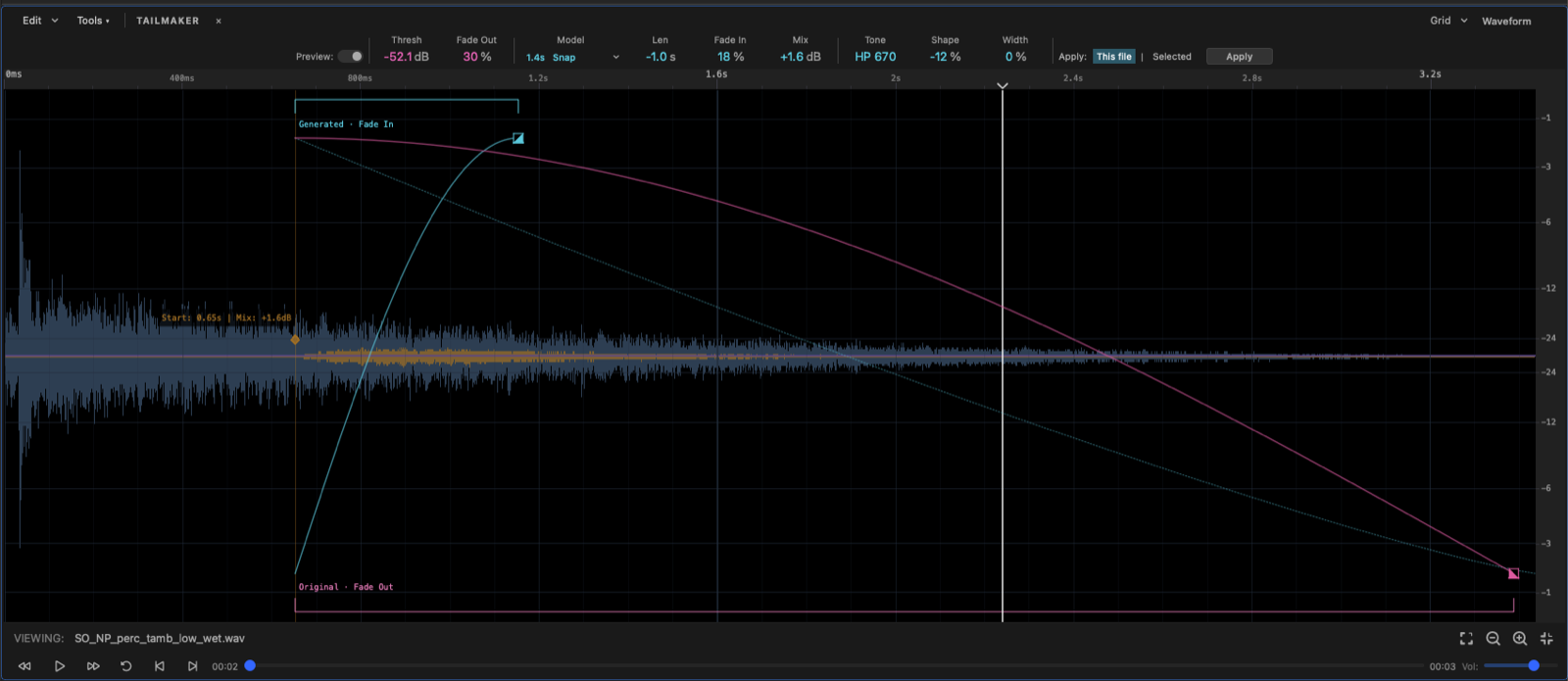
Natural tails, not chopped ones.
When a sample's tail is cut short, Tailmaker builds a new one from its own decay—set the threshold, shape the fade-out and fade-in, dial in tone and width. Made for percussive and tonal material alike, so the ending sounds like it was always there.
One price. No subscription.
- All features, forever
- Free updates
- Use on two machines
- 14-day full trial—no card required
Checkout opening soon—email for a license today.
Rolling Calder out to a team? Volume seats, invoice billing, and custom house-standards presets—enterprise@calder.tools
macOS 13 Ventura or later.
Questions, answered.
What are the system requirements?
macOS 13 Ventura or later.
How does the trial work?
Download the app and use everything, free, for 14 days. No card, no account. A license key unlocks it permanently.
Which samplers read the SFZs?
Anything SFZ-compatible: Serum 2's multisampler, sforzando, TAL-Sampler, and most modern soft samplers.
How many machines? What about updates?
One license covers two machines. Updates are free. If a paid major version ever ships, existing owners get a discount.
What if it's not for me?
Email within 14 days of purchase for a full refund.
Windows?
macOS only for now.
About the maker
Built out of frustration,
refined over 100 releases.
Ben Bromley has designed, produced, and shipped over 50 sample packs for Splice, with 7 million+ downloads—and QC'd well over a hundred more. For 5 years he's been the go-to pack finisher for Splice Originals and Splice Sessions, taking packs in varying states of order and disarray, then relabeling, refining, and mastering them for release.
The friction of editing tag-based filenames, the tedium of verifying sample-perfect loops by hand, the expensive subscription software that still didn't quite do the job—so he started writing his own, beginning with a few Python scripts to detect sample-length mismatches on labeled BPMs and edit filenames according to their component tags and phrases, not just as strings of characters. Over a few years and 100+ releases, he refined and added more tools, and finally put them together into one suite. Calder was built to be a more elegant and enjoyable way to refine audio assets into deliverable, trustworthy, verified products—for people to enjoy without issues.
More of Ben's work → benbromley.com